If a Thread Tube PN 006937-03 has come loose, thread might have gotten pulled into the Upper Arm. This could cause a Z Bind. You might also be getting a Z axis tracking error. Follow the steps below to try to confirm.
- Color Change to Needle #1.

- Turn the Machine OFF.
- Remove the Left (P/N 33094-02) and Right (P/N 33093-02) Color Change Drive Covers, also known as Clam Shell Covers.
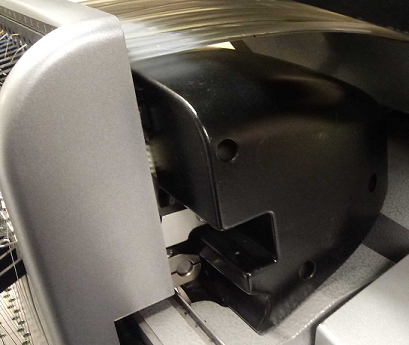
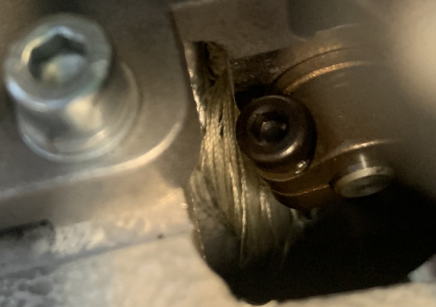
- Look into the Upper Arm to see if thread is visible around the Cam.
- WARNING!! If your machine color changes without the Right Upper Arm Front Cover, damage to your machine will occur and a service call will be necessary, Melco will not be responsible for any damage to the machine or related service costs caused by not performing this step.
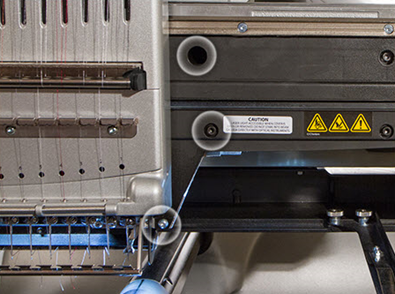
Remove the Upper Arm Right Front Cover. It’s attached with 5 screws.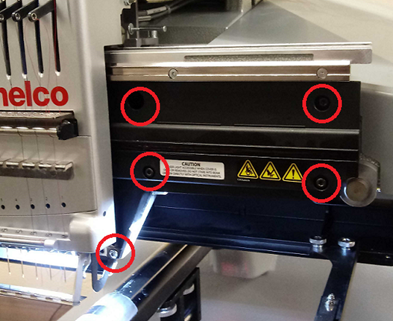
- If you see thread caught around the Cam, you can attempt to remove it by cutting it away with a razor. Do not use excessive force to remove thread.
- Reinstalled the Upper Arm Right Front Cover with its 5 screws. It is important to leave them just loose enough that the cover can still move, but make sure that the screws are far enough in that they will not catch the Needlecase as it moves over them.
CAUTION!! If your machine color changes without the Right Upper Arm Front Cover, damage to your machine will occur and a service call will be necessary, Melco will not be responsible for any damage to the machine or related service costs caused by not performing this step.
- Turn the machine ON.
- Color change to needle #12.
- Tighten the two screws on the right side of the Upper Arm Right Front Cover.
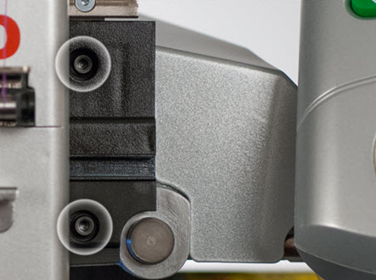
- Color change to needle #1.
- Tighten the three remaining screws on the left side of the Upper Arm Right Front Cover.
- If you were unable to clear the thread, are still getting a Z Bind, or Z axis tracking error, you might need a Melco Certified Technician. To confirm, you will need additional technical assistance. Here are the available Melco Technical Support