When installing a hoop and the hoop bracket does not snap in place, the hoop arm locator clips may need to be adjusted.
1. Loosen the 2 nuts shown below. Use a 5.5mm wrench or socket or an adjustable wrench.
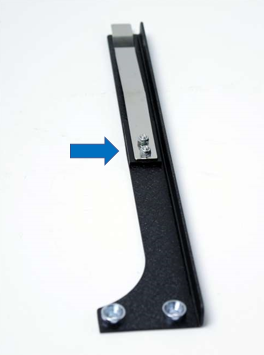
2. Pull the clip forward so the hoop bracket will snap in place.
3. Position the clip so it forms a tight fit. Tighten the 2 nuts.
4. Check that the hoop bracket will slide in and locks in place.
5. This may need to be done for both hoop arms.
Replacement Left (PN# 008214-01) and Right (PN# 008213-01) Locator Clips are available on ShopMelco.
Here are instructions for Swapping the Locator Tabs.
If assistance is needed contact Melco Technical Support.