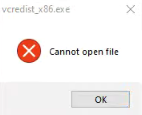
You might encounter this error when installing Melco software.
- Press the OK button. If the message comes back you might need to press it up to 10 times. If that doesn’t work, continue with the steps below.
- Restart your computer and then try reinstalling your Melco software.
- If the situation remains unresolved, you will need additional technical assistance. Here are the available Melco Technical Support options.