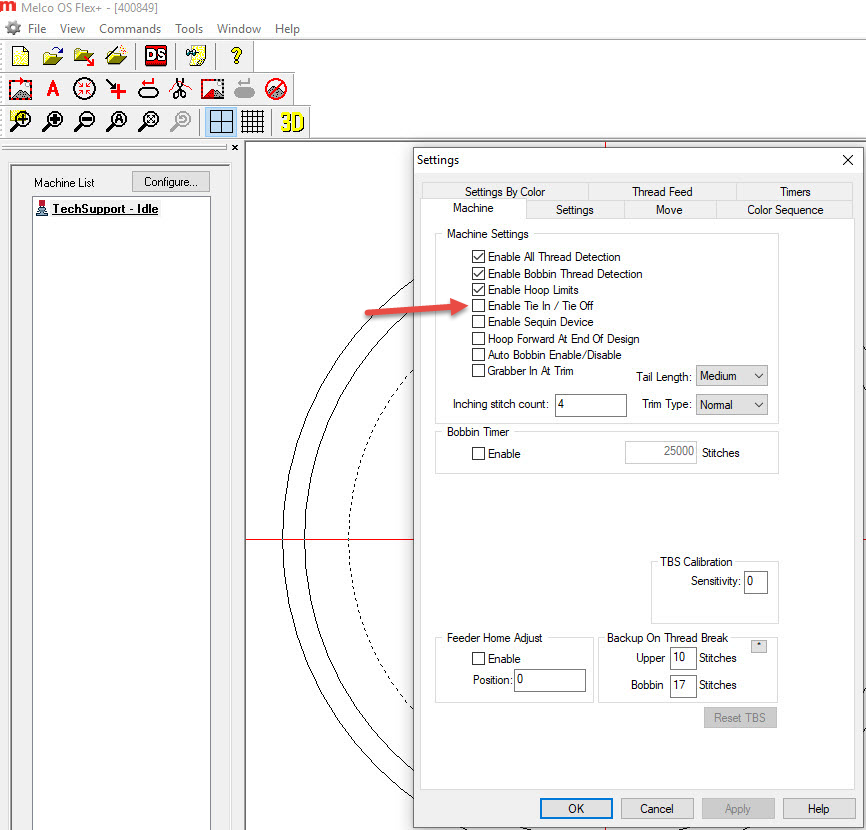
When loading a design file in Melco OS or Bravo OS version 11.09.096 or higher, if the screen goes completely grey and then reloads the design file, turn off the Enable Tie-In / Tie-Off feature detailed below.
Other symptoms may include:
- Necessity to load a design multiple times before it remains on the screen.
- Multiple Machines Unable to Load at the Same Time
- Auto Color Sequence did not work.
- Design Doesn't Show on Screen after Loading.
INSTRUCTIONS TO DISABLE TIE-IN / TIE-OFF:
In Melco OS, click Tools – Settings. Uncheck the “Enable Tie In / Tie Off” option.
Important Note, if it’s already unchecked, you will need to first CHECK this option, click Apply, and then UNCHECK the option and click Apply: